Why Winsly · Best of 2026
Best brag document apps in 2026, and who each is for
For work captured from GitHub or Jira, Bragduck or BragBook. For an iPhone journal with a coach that cites your entries, Bloomly; for one built on your company’s written promotion criteria, CareerClimb. On a budget, Accolade at $3 a month, or a free template. Choose Winsly if you want your wins tied to your manager’s own bar, verified by colleagues, and carried into a job search when you move.
At a glance
| Best for | Platform | Captures work for you | Ties wins to a bar | Price | |
|---|---|---|---|---|---|
| Bragduck | Automatic capture from developer tools | Web and command line, with a connector for coding assistants | Yes: GitHub, GitLab, Bitbucket and Jira | Objectives and key results; career ladders on Teams | Free; Plus $5 a month; Pro $10 a month |
| BragBook | Reviews, updates and posts from one timeline | Web | Yes, on Premium: GitHub, Jira, Linear and Asana | No | Free for 25 entries; Premium $8.99 a month |
| Bloomly | A career journal with a coach that cites your entries | iPhone, iPad and Mac | Yes, on Pro: GitHub, Google Drive and forwarded email | A job description, as context | Free; Pro $49.99 a year or $12.99 a month |
| CareerClimb | Working from your company’s promotion framework | iPhone | No: voice or text | Your company’s written criteria, from a photo | Free; Pro $9.99 a month or $79.99 a year |
| Winsly | A promotion case built on your manager’s bar | Web | No: you log it, drop a screenshot, paste a meeting or ask Claude or ChatGPT | Your manager’s own words | Free; Pro $20 a month; Advisor $50 a month |
| BragJournal | Linking wins to your review goals | Web | Forwarded email only | Your review goals, KPIs and competencies | Free for 3 achievements; Pro $6 a month or $50 a year |
| Accolade | The lowest price, with an application tracker | Web | No | No | Free for 10 wins a month; Pro $3 a month or $30 a year |
| Prov | Logging a win in one sentence | iPhone | No | No | Free; $6.99 a month, $49.99 a year or $149.99 once |
| BragLog | Paying once, with everything on your device | iPhone, iPad and Mac | No | No | $9.99 once |
| A free template | Starting today, for nothing | Any document | No | No | Free |
Best for automatic capture from developer tools: Bragduck
For engineers, engineering managers and PMs whose work already lives in GitHub, GitLab, Bitbucket or Jira. Its command line and “Sync now” pull that work in, and on Pro it fetches new work every morning as drafts for you to keep. Wins link to your objectives and key results, and turn into self-reviews, promotion cases as a PDF, and interview stories you can practice (Bragduck).
It also has a connector for Claude Code, Cursor, Windsurf and VS Code, so you can log a win where you write code, and a Teams plan adds review cycles and career ladders your company defines. It’s still marked beta, it’s built around engineering tools, and it has no job search or native phone app.
Free covers unlimited wins and 2 AI reports a month. Plus is $5 a month and Pro $10 a month, a little less billed yearly, and new accounts get 30 days of Pro free.
Best for turning wins into reviews, updates and posts: BragBook
For designers, PMs, engineers and researchers in tech who want one timeline of their wins. Entries carry tags, links and images, a weekly reminder keeps the habit going, and Career Composer turns them into self-assessments, 1:1 updates, resume bullets, LinkedIn posts and STAR interview stories (BragBook).
On Premium it imports work from GitHub, Jira, Linear, Asana and Dovetail. It doesn’t read Slack or email, its drafts don’t show which entry each line came from, and it has no bar for your next level or job search.
Free keeps 25 entries in total. Premium is $8.99 a month, with no yearly price shown. Winsly vs BragBook.
Best career journal for iPhone and Mac: Bloomly
For professionals who want a private journal on their phone that turns daily work into review material. You type or speak entries, and on Pro it imports from GitHub and Google Drive, takes forwarded emails, and saves screenshots and files from the share sheet. Its coach, BloomBar, answers from your entries and shows the sources behind each answer (Bloomly).
Reports cover reviews for any period, progress updates, 1:1 prep, interview stories and promotion packets. You can add a job description to each role as context, though it doesn’t map wins to a bar your manager set. It’s Apple-only, with no job search.
Free gives unlimited typed entries and one role. Pro is $49.99 a year with a 7-day trial, or $5.99 a week, and the App Store also lists $12.99 a month. Winsly vs Bloomly.
Best for working from your company’s promotion framework: CareerClimb
For people in tech going for a promotion, or recovering from a performance plan, at a company with written promotion criteria. You photograph or upload the criteria, and it lists each one, maps your wins to them and shows where your case needs more evidence (App Store). Summit, a voice-first coach with memory, helps you prepare before a 1:1 and log what you heard after.
Pro adds self-review drafts and updates your manager can use to argue for you. It’s iPhone only, captures nothing from your tools, and says plainly that it isn’t for job search.
Free covers win logging, one assessment and 5-minute coach conversations. Pro is $9.99 a month or $79.99 a year. Winsly vs CareerClimb.
Best for a promotion case built on your manager’s bar: Winsly
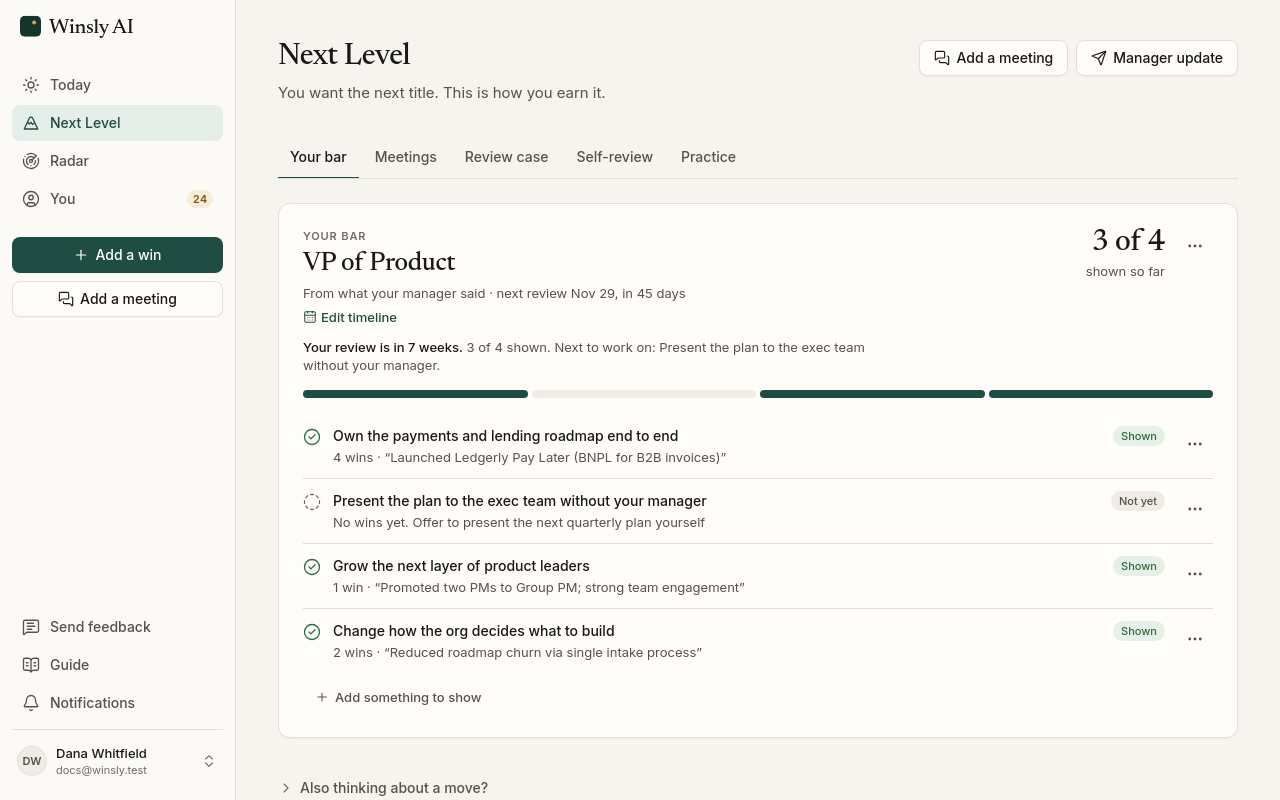
Winsly makes this page, so weigh this section with that in mind. It’s for salaried professionals in any field who are working toward the next level. What your manager said the next level takes becomes a bar, your wins map to each part of it, and every line of your review case shows the win it came from, checked before you see it. A colleague can verify a win by email, and it then carries their name; you can ask for references the same way.
You log a win in Winsly, drop in a screenshot, paste a meeting, or ask Claude or ChatGPT to log it. It captures nothing from GitHub, Jira, Slack or email, it’s web only with no iPhone app, and its paid plans cost more than any other app here. When the next level is at another company, Pro’s job search works from the same record: roles scored daily, and applications where every claim is cited.
Free covers the wins log, your bar, the review case on screen, manager updates, 10 win verifications a month and references. Pro is $20 a month or $200 a year and adds the case as a PDF, self-review drafts, interview stories and job search. Advisor is $50 a month or $500 a year and adds an advisor that runs a CFO’s playbook on your record, with scored practice for the promotion conversation. See the plans.
Best for linking wins to your review goals: BragJournal
For salaried employees with a review coming who want something quiet and simple on the web. You save achievements by hand, or forward an email such as a note of praise to a private address. You also save your review goals, KPIs and competencies, link achievements to them, and it drafts a brag document for a self-evaluation, a promotion packet or a manager update (BragJournal).
Its drafts don’t cite their sources, and there’s no interview prep, job search or connector for AI assistants.
Free holds 3 achievements and one draft. Pro is $6 a month or $50 a year, and for a limited time early users can pay $45 once for life.
Best for the lowest price: Accolade
For mid-career people who want a wins log and some help with a job search, for very little. You log a win in under 20 seconds and attach evidence: screenshots, links, metrics or PDFs. Its review assistant drafts answers for a 1:1, quarterly or annual review from the wins you logged (Accolade).
Pro adds Application Insights, which picks the 5 wins that best match a job, with a STAR story for each and the gaps to cover, plus a tracker for jobs you paste in. Entry is by hand only, it doesn’t find jobs for you, and there’s no bar for your next level.
Free allows 10 wins and 15 AI outputs a month. Pro is $3 a month or $30 a year, the lowest price here. Winsly vs Accolade.
Best for logging a win in one sentence: Prov
For people who want the lightest possible habit: type or dictate one sentence, and Prov keeps it beside a polished version. From your wins it writes briefs for a promotion case, a performance review, a job interview or a salary conversation, plus a weekly update. It has no streaks, scores or badges, and stores your log on your phone first (App Store).
It’s iPhone only, captures nothing from your tools, and doesn’t link a brief’s lines to the wins behind them.
Free includes 5 AI polishes a month. Pro is $6.99 a month or $49.99 a year, or $149.99 once. Winsly vs Prov.
Best for paying once, with everything on your device: BragLog
For people who want nothing in anyone’s cloud but their own iCloud. You log a win with a tap, a widget, Siri or Shortcuts, in one of six categories, and its on-device AI writes a brag document in a professional, confident or modest tone. There’s no account and no server (App Store).
It needs iOS, iPadOS or macOS 26, captures nothing from your tools, and has no bar, review case or job search.
It’s $9.99 once for iPhone, iPad and Mac, with no subscription.
Best free option: a template
Julia Evans’s 2019 post on brag documents still defines the habit, and it includes a template you can copy into any document. It works in any field and costs nothing.
You do the rest by hand: tagging wins, sorting them against what the next level needs, and writing the review. A template that starts with your manager’s bar.
How we compared
Winsly makes this page, and includes itself with its limits. Every price was checked on the date shown with the prices below, from the source linked beside it, and every feature from the product’s own site or App Store listing. If something here is out of date, write to us and we’ll fix it.
Who should choose which
- Bragduck or BragBook if you work in tech and want your work captured from GitHub or Jira.
- Bloomly if you want an iPhone journal with a coach that shows its sources.
- CareerClimb if your company has written promotion criteria and you want to work from them on your phone.
- BragJournal or Accolade if you want a simple web log for very little.
- Prov or BragLog if you want the lightest habit on iPhone, or to pay once and keep everything on your device.
- A free template if you only need a log and don’t mind writing the review yourself.
- Winsly if you want your wins tied to your manager’s own bar, verified by the colleagues who saw them, turned into a case where every line shows its source, and carried into a job search when you move.
Prices, checked October 13, 2026
| Product | Price | Source |
|---|---|---|
| Accolade | Free for 10 wins a month; Pro $3 a month or $30 a year | accolade.work |
| Bragduck | Free; Plus $5 a month ($4 billed yearly); Pro $10 a month ($8 billed yearly); 30 days of Pro free | bragduck.com |
| BragJournal | Free for 3 achievements; Pro $6 a month or $50 a year; $45 once for early users, for a limited time | bragjournal.ai/pricing |
| Prov | $6.99 a month, $49.99 a year or $149.99 once (iPhone); free for 5 AI polishes a month | App Store |
| BragBook | Free for 25 entries; Premium $8.99 a month | bragbook.io |
| CareerClimb | $9.99 a month or $79.99 a year (iPhone) | App Store |
| BragLog | $9.99 once, for iPhone, iPad and Mac | App Store |
| Bloomly | $5.99 a week, $12.99 a month or $49.99 a year (iPhone) | App Store |
| Brag document template (Julia Evans) | Free | jvns.ca |
| Winsly | Free; Pro $20 a month or $200 a year; Advisor $50 a month or $500 a year | Pricing |
Prices and features change. See something out of date? Write to support@winsly.ai. Product names are trademarks of their owners.
Questions
What’s the best brag document app?
It depends on how you work. Bragduck and BragBook capture work from GitHub and Jira, Bloomly and CareerClimb do the most on iPhone, and Accolade is the cheapest at $3 a month. Winsly is for people who want their wins tied to their manager’s bar and turned into a promotion case where every line is cited.
What is a brag document?
A running log of what you did at work, who or what it affected, and when, kept as you go so the evidence is there at review time. How to keep one.
Do brag document apps capture work automatically?
Some do. Bragduck pulls from GitHub, GitLab, Bitbucket and Jira, BragBook imports from GitHub, Jira, Linear and Asana on Premium, and Bloomly reads GitHub and Google Drive on Pro. Winsly doesn’t: you log a win, drop a screenshot, paste a meeting, or ask Claude or ChatGPT to log it.
What is the best alternative to BragBook?
Bragduck if you want capture from GitHub, GitLab or Bitbucket for less, Bloomly if you’d rather keep your log on an iPhone with a coach that cites it, and Winsly if you want a promotion case built on your manager’s bar.
Is a free brag document template enough?
For keeping a log, yes. A template doesn’t tag wins, link them to your bar or draft your review, so you do that by hand when review season comes. A template that starts with your manager’s bar.