Guide · Get promoted
Next Level and your review case
Turn what your manager said it takes into a clear bar, see which wins prove it, and take a selective case into your review.
The fastest way to the next level is to know exactly what it takes, then show that you’re already doing it. Winsly makes both of those concrete.
Get the test defined before you take it
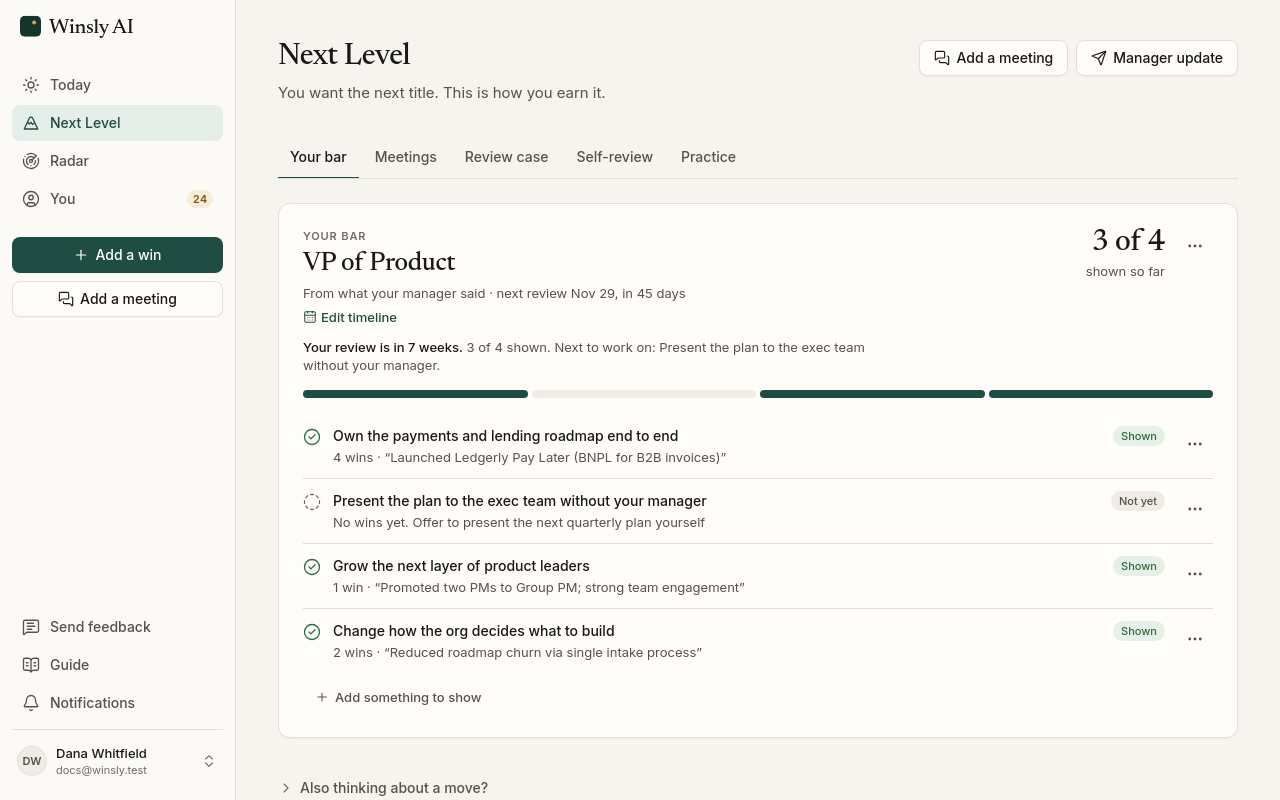
Open Next Level, name the role you’re aiming for, and paste what your manager said it takes. Winsly turns those words into specific criteria, each with a next step.
Don’t have your manager’s words yet? Winsly drafts a starting bar and three questions to ask in your next one-on-one. “Show more leadership” isn’t a bar; “run the quarterly planning process end to end” is.
Your first bar comes from setup. Give it a timeline (when your next review is, and when you want to get there) with Edit timeline, and change it whenever your plans do.
Bring your meetings in
The best source for your bar is the conversation where your manager talks about it. Choose Add a meeting (under Add a win, or at the top of Next Level; on Pro and Advisor, as many as you like) and paste the transcript of a 1:1, a skip-level or a review, or your notes from it. Transcripts from Zoom, Teams, Meet and Otter all work, and so do .vtt, .srt and Word files.
Winsly reads it for what matters to your next level and lays it out as cards: what the next level takes, in your manager’s words; when your review is; wins and praise worth keeping; what you each agreed to do; feedback; the people who matter, and what they could vouch for; and customer names to keep private. Each card shows the line it came from and what saving it would change. Fix anything that’s off, untick what shouldn’t go in, and save.
What you agreed lands on Next Level → Meetings, with who’s doing it and by when, to tick off as it’s done. On the Advisor plan, your advisor follows up on the dated ones.
Winsly reads the meeting once. It keeps the cards you save, each with the line it came from, and never the transcript.
Organize the evidence around the job above yours
Winsly links your wins to each criterion and shows how many are proven. You can link a win yourself, or say one isn’t proof, and your call always wins.
The argument for a promotion is never “look at everything I did.” It’s “you said I needed to show A, and here are the examples of A.” That’s what this page builds, week by week.
Your review case
Review case builds the selective version to take into your review: up to three wins per criterion, strongest first. Keeping it selective is the point. The raw log is exhaustive; the case is not.
A win someone verified carries their name in the case: “Verified by Priya N., peer”. Under each part of your bar, a win nobody has verified yet offers Get it verified; see Your wins log.
On Pro and Advisor you can download the review case as a PDF.
Your self-review
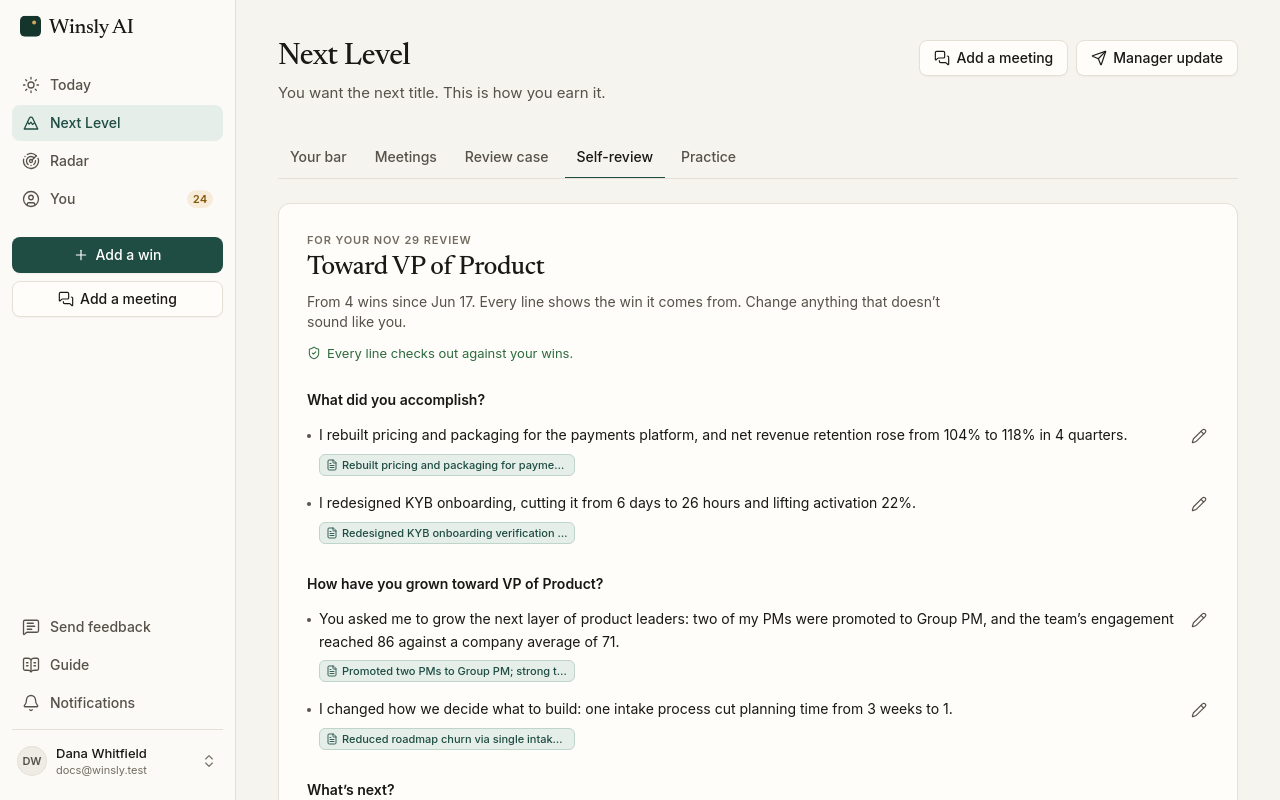
When the review form arrives, open Self-review (on Pro and Advisor). Pick the period and whose questions to answer: Winsly’s three, or your company’s, pasted in. Winsly drafts the answers in your voice from that period’s wins, organized around what your manager said the next level takes. The everyday work stays out; the conversation is about the work that shows you’re ready.
Every line shows the win it comes from, so nothing in it is a stretch. If a line has a number your wins don’t, or a name you keep private, Winsly points it out before you copy anything. Edit any line, copy the whole thing as text and paste it into your form. Winsly never sends it.
It ends with an ask, because the time to ask is every cycle. Once you’ve shown most of the bar, it asks to be considered for the role. Before that, it asks for the work that would show what’s still missing.
Practice the conversation
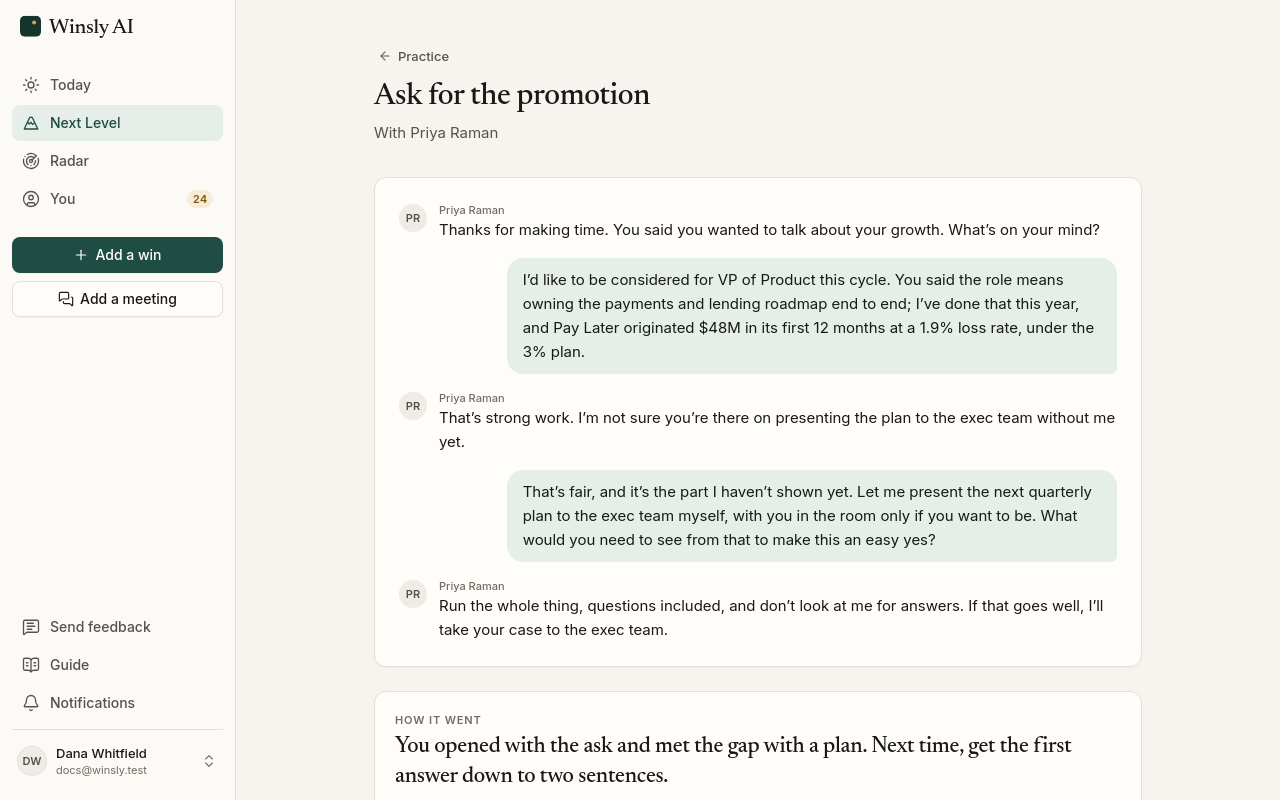
The conversations that decide a promotion are hard to get right the first time. On the Advisor plan, Practice lets you rehearse one before it happens, against someone who pushes back the way a busy manager would. Answer the way you would in the room, ideally out loud first.
Afterward you see how you did, with a line of yours rewritten the way it could sound. Practice uses the numbers in your wins and points out any it can’t find there.
Share your progress
Nobody remembers all the little things you do, so tell them. Manager update drafts a short note to your manager or your manager’s manager about what moved lately: one line per win, each one you chose. Winsly ticks the strongest; untick anything you’d rather keep. It can also ask for the next piece of work your bar calls for.
Copy it or open it in your email, and send it yourself. Mark it sent and your next update picks up from there. Today reminds you when there’s enough worth sharing.
Roll each cycle into the next
After the review, Start next cycle keeps the bar where it ended and opens the next one. Your log carries on: here’s what you asked me to prove, here’s the proof, now what’s the gap to the next level?
Thinking about a move instead?
If you’re also looking at roles somewhere new, Next Level shows what those roles ask for, worked out from the roles you’ve rated on Radar, one click below your bar. Setting up a search never changes your bar.
Next Level is on every plan, Free included.