Guide · Grow your career
Practice the conversations that matter
Rehearse the promotion ask, an interview or a hard conversation with someone who pushes back like the real person, then get a review of how it went.
The conversations that decide a promotion are hard to get right the first time. Practice lets you rehearse one before it happens, against someone who pushes back the way the real person would, and then tells you how it went. It's included in your plan: a typed session uses 7 credits, and out loud is by the minute.
Practice has its own place in the menu. Open it and pick what you're preparing for:
- Get promoted: make the case to your manager for the next position.
- Expand your role: ask for the work that would grow your scope, and make yes easy.
- Ace your interview: behavioral questions (how you think and decide) or domain questions (how deep your expertise goes), getting harder as you go. To practice one of your stories, start from You → Stories: the interviewer opens with the question it answers.
- Executive presence: two minutes with a senior leader. One decision, under pressure.
- Have a tough conversation: give or receive feedback, challenge a decision, address someone's missed commitments, resolve a conflict, or set a boundary.
Or describe your own, in a sentence: who's across the table and what you need from them. Winsly matches it to the closest one. If what you wrote isn't a conversation yet, it says so and asks who you need something from.
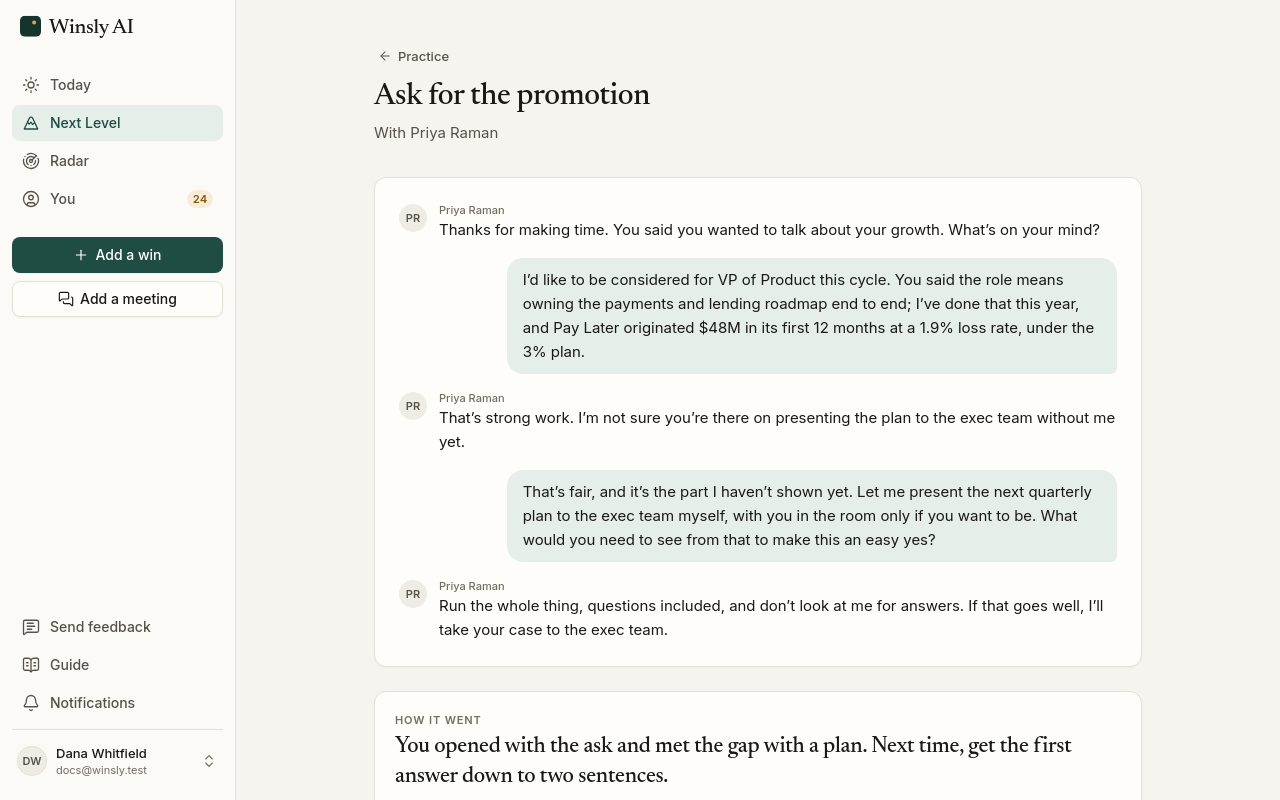
How a session goes
Choose who's across the table. Your manager from Settings → Your people is already picked for a promotion conversation, and you can add anything they should know. In a promotion, more-scope or executive presence practice with your manager or skip-level, you can also pick how they'll come across, just for this practice: Winsly's default or one of four personalities (see Practice with someone you know). If you've set them up, that's what's picked. Then the other person opens, or you do, depending on the conversation.
When your advisor suggests a practice, it's set up with what you talked about. The other person opens on it (“You wanted to talk about the Senior PM criteria”), and what you'd tell them going in is already filled in, for you to change.
Answer the way you would in the room, before the clock runs out. They react to what you actually said: a strong answer earns a harder question, and a vague one gets pressed. There's no coaching along the way and no score until the end, the same as the real thing. Each session has a few replies (five for a promotion conversation and an interview, four for the others), and it ends early when you've got a real answer or three of your replies in a row haven't moved it forward.
The other person knows your role, the position you're going for, who they are to you and what you told them about the situation, the way the real person would. They don't know the details of your work, so bringing it is up to you: what you did, the numbers, your part. They'll press on what you say the way a skeptical listener would, but they never correct a detail or invent facts about you.
Out loud or typed
You can practice out loud, the way the real conversation will go, or type what you'd say. Out loud is picked when it's on for you; choose Typed in setup instead, and Winsly remembers your choice.
Out loud, the other person sits across the table from you: their name and who they are to you, and you below. While someone talks, their side shows sound waves. You never see the words while you talk: you hear them and answer, as in the room. Before you start you can pick the voice they speak in (Even, Warm, Brisk or Low; tap one to hear it), and headphones keep their voice out of your microphone. They answer the way people do across a table: quickly, sometimes with an "mm" or "okay" while they gather the thought. You can cut in while they talk, and a quick "mm-hmm" or "yeah" won't stop them. Mute (or M) and End are below. If the call drops, Rejoin picks it up where it was. If your microphone isn't allowed, Type instead switches the session to typed before your first reply.
Practicing out loud uses 20 credits a minute, on top of the session's 7. Your credits decide how long a call can run: when it starts, Winsly sets aside credits for its minutes (or for as many as you have, and the call ends then), and when it ends you pay only for the minutes it lasted; the rest come back. If your credits won’t cover the whole call, Practice says so before you start.
The clock
Each conversation has a time limit, shown quietly beside you. It's the most it can run, not a target: a conversation that reaches a real answer ends sooner. Out loud, it's two minutes for executive presence (the time a busy senior leader gives you), giving or receiving feedback and setting boundaries; three for a promotion conversation, expanding your role, challenging a decision, addressing underperformance and resolving a conflict; and five for an interview. Typed sessions get longer: twelve minutes for a promotion conversation, sixteen for an interview, four for executive presence and ten for the others. In the last 30 seconds it turns amber, and shows even if you've hidden it. Tap it to hide it, and tap the clock to bring it back; Winsly remembers which you like.
When the time runs out, you finish what you're saying, the other person closes the conversation in a line or two, and your review starts. The review notes that time ran out. When a conversation ends, on time, on your last reply or after three that didn't move it, the other person closes it, and the review never counts a question you didn't get the chance to answer. A typed session you leave before your first reply starts its clock again when you come back.
Your review
When the conversation ends, your advisor gives you the review. Its panel opens beside the conversation with a score out of 5, the one thing to take into the real conversation, and each part of how you did. Tap Show details to see why each part scored as it did, a line of yours and how it could sound instead, the moments that decided it and what to practice before the real conversation. An interview is reviewed question by question.
You're scored on how you came across in the conversation, never on whether a detail matches what you've logged. A suggested rewrite only uses what you actually said.
If you said something worth keeping, your advisor offers to save it: a win you haven't logged yet, or a number for one you have, each with the sentence you said. Untick what you don't want, then Save. Then pick what to do next, or just keep talking. The review also stays with the session in your history.
How you come across under pressure, like your pace and pauses, needs your voice. Out loud, your review scores your composure and shows your pace, how long you took to start each answer and how often you paused. In a typed session, that part waits.
From the review you can Practice it again, Work on the weakest part (the other person presses on it), or Talk it over with your advisor. That chat starts the way it did when the session ended, with the score and the review, and so does opening your advisor on a reviewed session when you haven't started a chat yet.
Every session keeps its conversation, typed or out loud, right where you can read it on the session's page. Your advisor can read it too, from any session in your history: ask what you said in last week's promotion practice, what you should have said instead, or to pull out a win you mentioned and never logged.
Practice with someone you know
Your manager and your skip-level don't think alike. In a promotion conversation, your manager has to argue your case in calibration, so they test whether it would hold up there. In an executive presence practice, your skip-level sees you from a distance, through outcomes, with little time for detail. Practice plays each of them that way, even if you set nothing.
To make it sound like your real boss when you practice a promotion, more scope or executive presence with them, open Settings → Your people and open the person:
- Personality. Winsly's default, or one of four. Numbers-first wants the result and the number behind it. Big-picture wants to know why it matters beyond your team. People-first is on your side and asks how others see you. Cautious thinks about calibration, timing and risk. A sample shows how each would answer the same thing.
- More about them. Toughness (Easier, Default or Tougher: a tougher one starts skeptical) and Warmth (Cooler, Default or Warmer). What's on their plate: up to four pressures or promises, in your words, like "Promotions are capped this cycle". How they see you so far, in a line, like "Strong on delivery, not yet strategic".
It saves as you go. Practice with them starts a session, and Reset to Winsly's default clears it. Or tell your advisor: "my manager is all about the numbers", or "make Priya tougher in practice". It saves it, shows you what changed, and you can Undo. A session says who you're talking to and how: With Priya, your manager · Numbers-first.
Some things don't change, whoever you pick. They know your role and where you're going, never the details of your work, and they never invent facts about you. They ask one thing at a time. A strong answer moves the conversation forward whatever their personality, and tough means direct, never rude. Your review is scored the same way for every personality. It uses who they were to make its advice specific: "lead with the number: that's what she presses on".
Attach a meeting to a message to your advisor and ask it to learn how someone in it talks. Winsly notes how that person talks: what they care about, a few short things they said, their words, what they push back on and how they decide. In Practice, they play the other person that way, and setup shows Knows how they talk next to their name. You see it in Settings → Your people, under the person, where you can Edit it, Forget this, or Practice with them.
Your history
Every session stays in Practice, newest first, with its score. Open one to see the conversation and its review. Each session has a menu (point at it, or tap ⋯ on a phone):
- Pin keeps it at the top, under Pinned.
- Rename lets you name it in place. Press Enter to save or Esc to cancel.
- Retry starts the same practice again: the same conversation, the same person and what you told it about the situation. It's a new session, so it uses credits like one.
- Delete removes it with its review, after you confirm. The credits it used aren't given back. Your advisor sees how your recent sessions went, so it can suggest the next one, and it can recommend a practice when you tell it about a conversation coming up.